


New Ways to Customize and Interact with Your Content in NotebookLM
News | 20.03.2026
Google has announced a major update to NotebookLM, expanding content interaction and data visualization capabilities.
These updates allow Google Workspace users to customize their AI experience and utilize new information presentation formats.
More functions and new visual communication tools:
- Slide revisions: Users can now revise presentation content, ask for changes, or fix issues on both desktop and mobile. By submitting stylistic or factual feedback for each slide, the deck is quickly regenerated as a new version in the Studio panel.
- Cinematic Video Overviews: Immersive, deep-dive videos with fluid animations and rich visuals designed to help you engage with complex topics. Gemini models make hundreds of structural and stylistic decisions to tell the best story using your sources, ideal for academic research and narratives.
- New infographic styles: Manually choose from ten predefined styles to visually summarize sources: Sketch Note, Kawaii, Professional, Scientific, Anime, Clay, Editorial, Instructional, Bento Grid, and Bricks. By default, NotebookLM auto-selects the optimal style for your data.
- Improved flashcards & quizzes: Progress is now saved and loaded across sessions. Users can mark cards as "Got it" or "Missed it," shuffle the deck, and rerun missed cards using a new results screen. Specific cards or quiz questions can also be deleted.
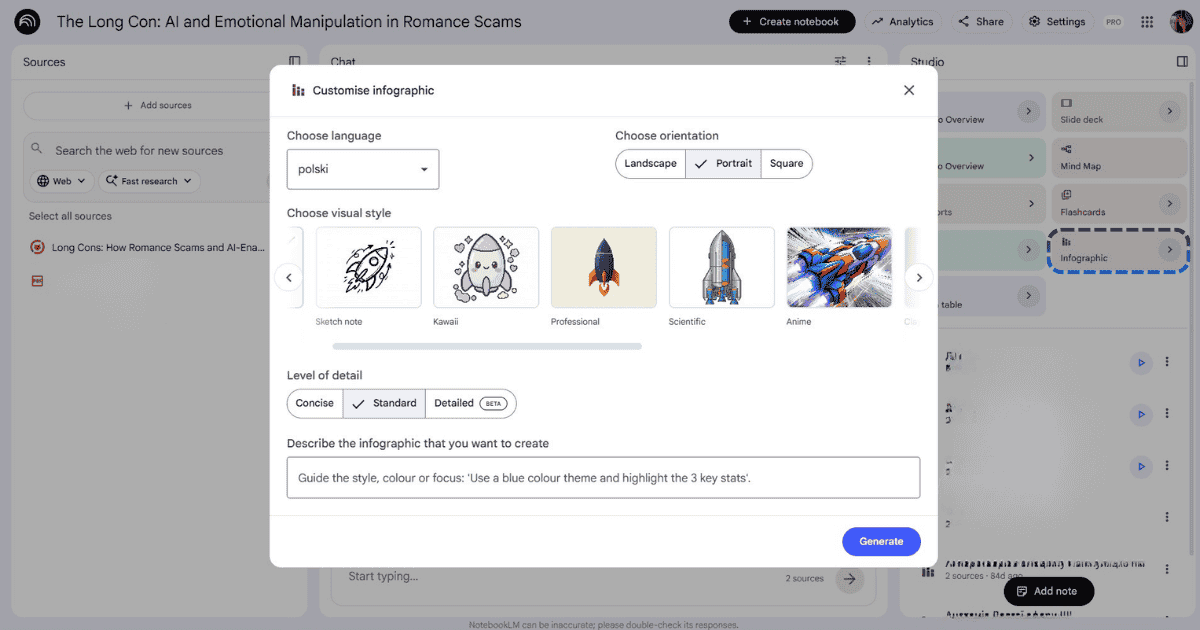
NotebookLM infographic customization interface
Support for more file types:
EPUB: NotebookLM now supports EPUB files, the standard open-source format for eBooks, making it easier to interact with long-form digital books.
PPTX export: Generated slide decks can now be exported as PPTX (in addition to PDF).
Chat improvements:
- Saved and secure conversation history: Conversations are automatically saved and kept private to support long-term projects. You can resume sessions later without losing context. In shared notebooks, your chat is visible only to you.
- Artifact creation in chat: Instantly transform chat conversations into stunning Audio Overviews, Video Overviews, tailored reports, and more directly within the chat interface.
Softprom is your trusted Google Workspace Premier Partner. We provide professional support and implementation of Google Workspace solutions for clients locally.
By partnering with us, you receive all necessary financial documents from a local supplier, and payments are made in local currency in accordance with your country's legislation. Read more about our status: Softprom — Google Workspace Premier Partner.
Availability
Slide revisions, new infographic styles, improved flashcards & quizzes, EPUB as a source, PPTX export, saved and secure conversation history, artifact creation in chat
- Available to all Google Workspace customers and users with personal Google accounts with access to NotebookLM
Cinematic Video Overviews (English only)
- Business: Business Standard and Plus
- Enterprise: Enterprise Standard and Plus
Share:


