


Absolute Control: An In-Depth Review of the Wacom Art Pen 2 Professional Stylus
News | 01.07.2026
Wacom graphic tablets and displays are the industry standard for digital content creation. While standard Wacom styluses, such as the Pro Pen 2 and Pro Pen 3, fully cover general drawing and retouching tasks, certain disciplines demand specialized control.
For calligraphers, typeface designers, and digital painters, Wacom developed the second-generation Art Pen 2 (ACP70000DZ).
In this review, we examine how the hardware 360-degree barrel rotation works and why it serves as an essential companion to Wacom's standalone OLED tablet, the MovinkPad Pro 14.
Understanding Hardware 360-Degree Barrel Rotation
When using a standard stylus, changing the angle of a virtual flat brush or marker requires using software sliders or hotkeys, which interrupts the creative process. The Wacom Art Pen 2 addresses this limitation with a built-in hardware rotation sensor.
As you rotate the pen body in your fingers, compatible creative applications instantly register this 360° axial movement. This allows you to vary line thickness and direction naturally, mimicking the response of a real flat brush, chisel marker, or calligraphy pen. Powered by Wacom's electromagnetic resonance (EMR) technology, the stylus operates without batteries or cables.
360° physical pen rotation by hand -> Instant brush tip rotation on screen
Mobile Workflow: Synergy with the MovinkPad Pro 14
The Art Pen 2 is compatible with desktop Cintiq displays and Intuos Pro tablets, but it also works with the standalone 14-inch OLED tablet, the Wacom MovinkPad Pro 14 (DTHA140L0Z). i Support for additional Pro Pen 3-enabled Wacom devices is planned.
Equipped with a Snapdragon 8s Gen 3 processor running Android 15, the tablet features a 120Hz OLED display that delivers near-zero pen latency. This combination creates a portable studio setup:
- On-the-go Productivity: Design, sketch, and write calligraphy anywhere without connecting the tablet to a computer.
- OLED Contrast and Friction: The backlight-free OLED panel provides true blacks and precise contrast. Wacom Premium Textured Glass delivers paper-like physical resistance as you rotate the pen.
- Hybrid Integration: When you return to your desk, connect the MovinkPad Pro 14 to your PC with a single cable to use it as a high-end secondary OLED screen supporting all Art Pen 2 features.
Build Quality and Custom Nibs
Unlike the modular Pro Pen 3, the Art Pen 2 features a solid unibody construction shaped like a thick marker, with a fixed center of gravity. This rigidity prevents internal parts from shifting, ensuring consistent calibration for the rotation sensor.
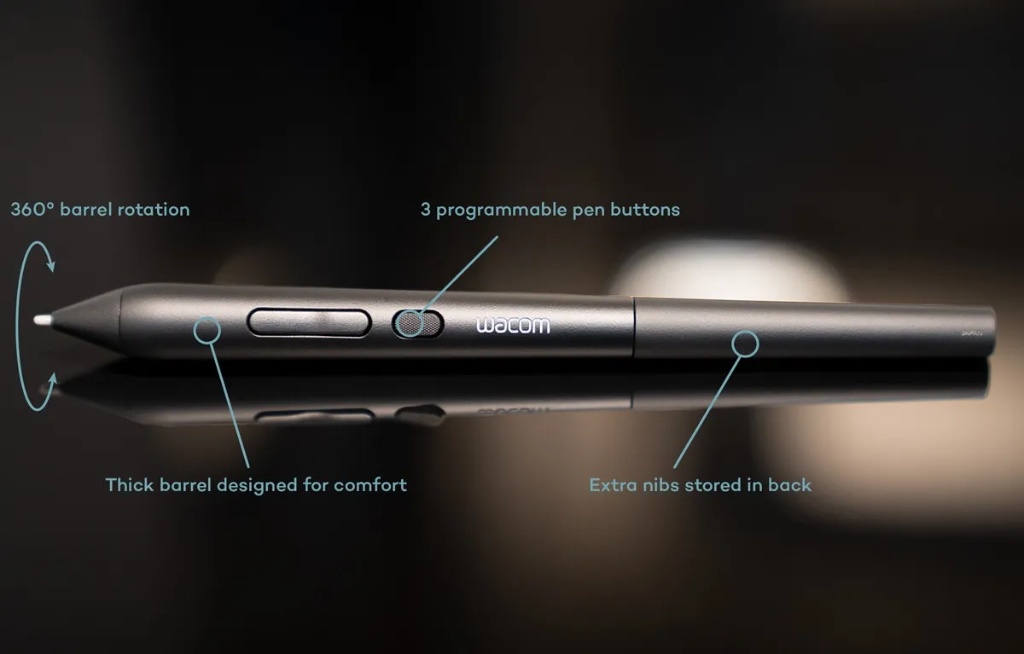
The rear of the pen houses a built-in storage compartment containing three specialized replacement nibs:
- Carbon Shaft POM (ACK256011Z): Featuring a reinforced carbon-fibre shaft. It does not flex under heavy pressure, ensuring precise control for vector ink work and typography.
- Standard POM (ACK25611Z): A durable polymer offering smooth, responsive gliding across screen surfaces.
- Felt Nibs (ACK25619Z): A textured felt tip that mimics the physical tooth and resistance of graphite on paper.
! Note: Wacom Art Pen 2 nibs and Pro Pen 3 nibs are not interchangeable due to different physical dimensions.
Software Calibration and Settings
Ensure your tablet driver and device firmware are updated to the latest version via the Wacom Center.
- Adobe Photoshop: Open Brush Settings (F5), navigate to Shape Dynamics, find Angle Jitter, and set Control to Rotation. Keep Caps Lock deactivated to see the brush silhouette rotate on the canvas.
- Krita: Native support is available from version 5.0 onwards. If the stroke orientation is mirrored, edit the angle sensor properties and map the response curve as a straight diagonal line from the bottom-left to the top-right.
- Clip Studio Paint: CSP combines rotation with tilt metrics. Enable the brush angle setting to respond to Pen Tilt, and the software will track the physical barrel rotation of the Art Pen 2.
Business Value: Commercial Digital Artistry
The hardware barrel rotation allows artists to speed up their commercial workflow and target high-value creative niches:
- Digital Typography and Calligraphy: Designing custom logotypes and brand packaging. The Art Pen 2 allows you to draw scripts directly on the screen, preserving the organic flow of the hand and removing the need for scanning and vector tracing.
- 3D Texturing for Game Dev: Painting stylized hand-painted textures in Blender or 3D Coat on your mobile MovinkPad Pro 14. Real-time rotation allows you to paint complex organic patterns (such as fur, scales, or stone) along 3D geometry in a single stroke.
- Editorial Illustration: Using the felt nib in combination with a flat digital brush allows illustrators to build organic watercolor and gouache textures for publishers.
Technical FAQ
No, they are completely incompatible due to different internal shaft diameters.
This is an inherent limitation of Photoshop's UI rendering loop. The actual coordinate data is processed with near-zero latency, so your painted strokes will be perfectly accurate. Krita and Clip Studio Paint update the cursor smoothly in real-time.
No, the Art Pen 2 features a unibody design with a fixed balance to maintain accurate rotation tracking.
Softprom: Authorized Distribution
As the official authorized distributor of Wacom products, Softprom provides design studios and independent creators with certified hardware, original consumables, and localized technical support to ensure your pipeline remains productive.
Share:


