


How to detect and investigate lateral movement in network traffic
News | 18.06.2026
In today's network infrastructure, practically any cyberattack leaves traces in network traffic and is accompanied by the movement of an attacker between different network nodes. Whether it is a web server compromise followed by penetration into the internal segment, an attack starting with a phishing email, network scanning from a test or guest Wi-Fi segment, searching for open TCP/UDP ports, or attempts to exploit known vulnerabilities in operating systems and network equipment — all of these actions inevitably generate network activity.
That is why deep network traffic analysis is one of the most effective ways to detect signs of compromise. Unlike traditional security tools such as EDR or XDR, which only monitor devices with the corresponding agents installed, network traffic analysis allows for the detection of suspicious activity even on servers, network equipment, IoT devices, and other systems not covered by endpoint protection tools.
This propagation of an attack within the network infrastructure is called lateral movement. This is a stage of a cyberattack during which an attacker, having gained initial access to a single device, begins to move through the network from node to node in search of valuable data, critical servers, or high-privileged credentials. Their goal is to expand control over the infrastructure and reach the organization's most critical resources while remaining undetected for as long as possible.
Lateral movement rarely attracts attention on its own. An attacker using native operating system tools, such as SMB, RDP, WMI, or PSExec, often looks almost identical to a system administrator performing routine administrative tasks. This is why traditional security tools are not always able to distinguish legitimate activity from the actions of an attacker in a timely manner.
Detecting lateral movement is considered one of the most critical tasks of modern network monitoring systems and NDR solutions. Its presence is a strong indicator that an attacker has already established a foothold in the infrastructure, gained control over one or more hosts, and is attempting to expand their influence to other segments of the IT environment.
This article examines how lateral movement manifests in network traffic, what signs and indicators to look out for, and how to systematically investigate such activity. Each section is built on the example of real-world threats and can be used as a guide for investigating incidents within your own infrastructure.
The presented investigations are based on using GREYCORTEX Mendel — an NDR solution for network traffic analysis. The advantage of such analysis is the ability to detect threats without needing to install agents on network devices, which immediately expands the control zone of the Information Security Management System (ISMS) to office peripherals, telephony, mobile devices, agentless devices, IoT/IIoT, HoT technologies, and enhances traditional security systems such as EDR/XDR, NGFW, SIEM, Sandbox, Deception, and others.
The described detection scenarios and investigation methodologies are universal and can be applied in any environment where network traffic visibility is ensured at the network infrastructure level.
Let's look at four common protocols that attackers use to move across a network:
- SMB (Server Message Block) — a standard Windows protocol for sharing files, folders, and network resources.
- PSExec — a remote administration tool that allows running commands and programs on other computers on the network.
- RDP (Remote Desktop Protocol) — a remote access protocol providing full graphical access to the desktop of a remote system.
- LLMNR (Link-Local Multicast Name Resolution) — an auxiliary name resolution protocol in a local network used in cases where DNS cannot find the required resource.
It is important to understand that these are not specialized tools that attackers bring with them. These are widely used network protocols and mechanisms that are an integral part of virtually any corporate infrastructure and are actively used by operating systems, servers, and business applications.
It is their widespread use that makes these protocols a convenient tool for lateral movement. Let's look at each of these protocols, how attackers can exploit them, and what to look out for during information security incident investigations.
SMB and Windows Administrative Shares
Server Message Block (SMB) is the primary file-sharing protocol in a Windows infrastructure. SMB traffic is present in almost every corporate network, making it highly convenient for lateral movement.
Access to Windows administrative network shares, particularly the ADMIN$ share, poses a special risk.
ADMIN$ is a special resource on Windows OS that Windows automatically publishes via SMB. It points to the system directory (usually C:\Windows), provides access to the system directory, and is used for remote OS administration. ADMIN$ is automatically created on all Windows hosts and is accessible to users with administrative privileges.
In fact, \\SERVER\ADMIN$ is the network representation of the C:\Windows folder on a remote server.
Although this share does not appear in the standard list of network resources, it is always present in the system and can be used to copy files, install software, and perform administrative operations.
This resource provides direct access to the Windows system directory on a remote computer. By gaining access to it, an attacker can copy files, run scripts, and transfer tools between network nodes without interacting with the external security perimeter.
What can be seen in Mendel
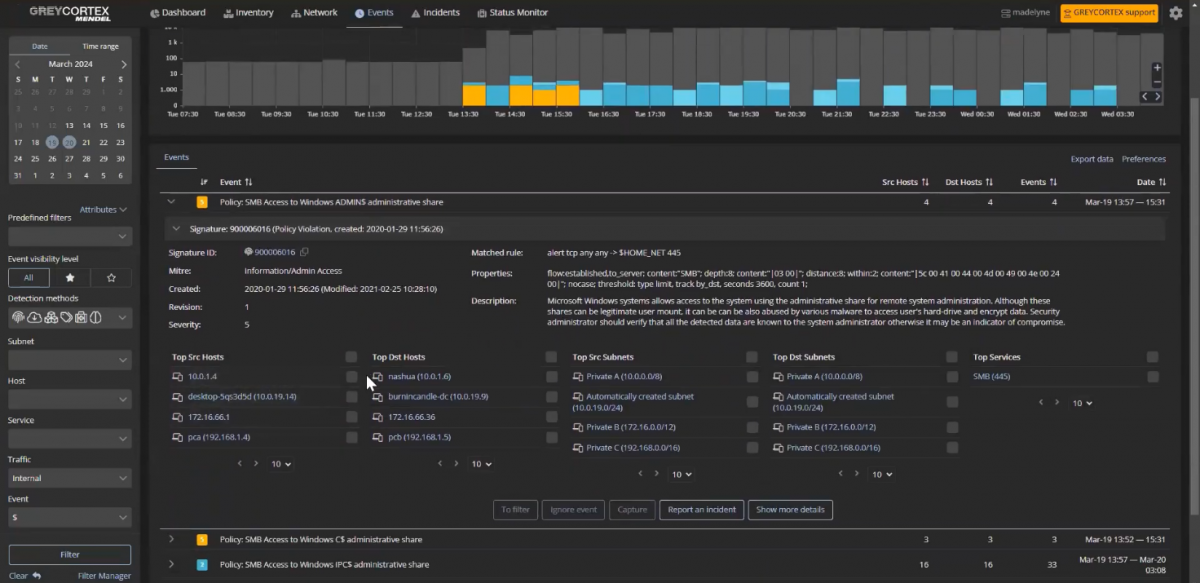
When the ADMIN$ resource is accessed, GREYCORTEX Mendel registers the corresponding event. During the analysis, it is necessary to navigate to the application protocol level and pay attention to the following parameters:
- the SMB protocol version used in the session;
- the specific network resource or the path to it;
- file operations associated with this session.
The activity of a legitimate administrator usually differs from the actions of an attacker. In most cases, after gaining access to ADMIN$, an attacker proceeds to execute commands or launch programs, which is reflected in the network flow data.
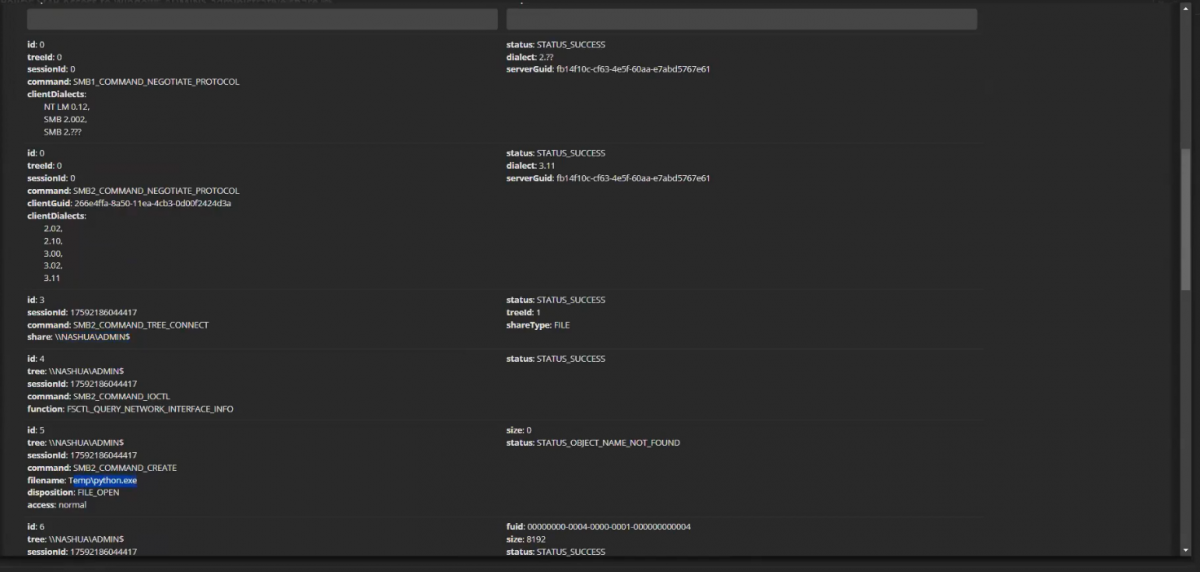
For example, during one of the investigations, a detailed traffic analysis revealed the execution of python.exe via a connection to ADMIN$. Such activity is atypical for system administration and may indicate an attempt at lateral movement or the execution of malicious code on a remote node.
What to look out for during an investigation
- Who initiated the connection? First and foremost, it is necessary to determine the source of the connection. It is worth checking whether the IP address belongs to a known administrator, a service account, or a system for which such activity is common.
- Check the time of the event against the scheduled maintenance log to see if such a time is typical for system maintenance.
- Check the operations being performed to see whether the access was accompanied by copying files, running scripts, executing commands, or creating new processes on the remote host. It is these actions that frequently indicate an attempt at lateral movement or that the attacker has access to internal resources.
Remote Administration via PSExec
PSExec is a lightweight remote administration tool from the Microsoft Sysinternals suite that allows running commands and programs on remote computers without needing to open a full RDP session. System administrators use it to automate tasks, perform remote maintenance, and manage servers. Attackers exploit this tool for the exact same purpose — to execute commands on compromised systems and further move through the network.
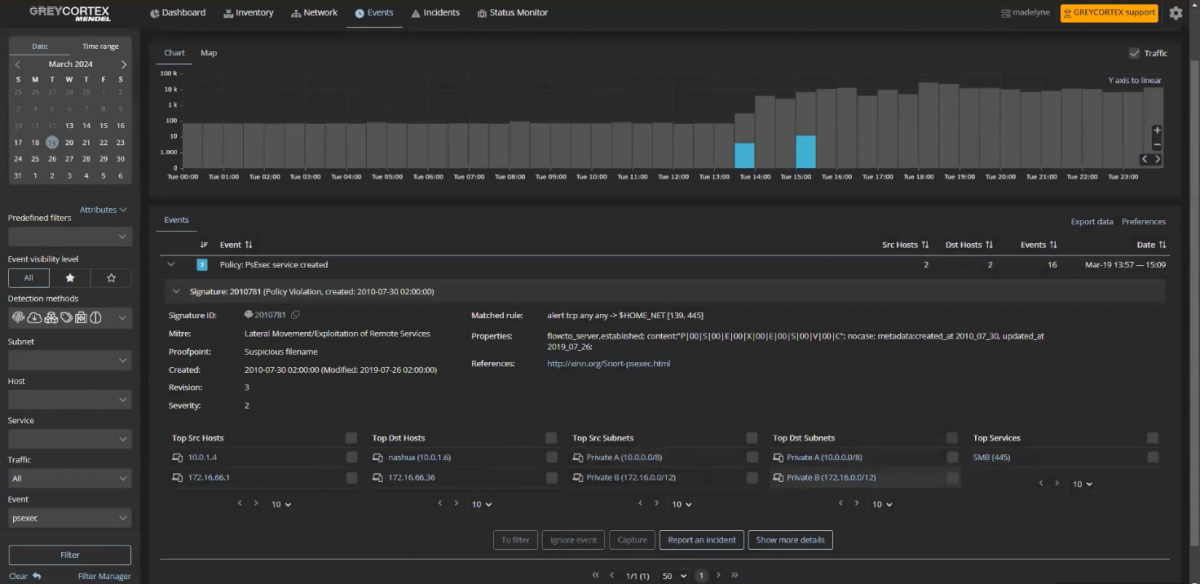
A key characteristic of PSExec is that its activity is quite visible in network traffic. With each launch, PSExec creates a temporary PSEXESVC service on the target host using the SMB protocol over TCP port 445. The creation of such a service is reflected in network flows and serves as one of the most reliable indicators of lateral movement.
What can be seen in Mendel
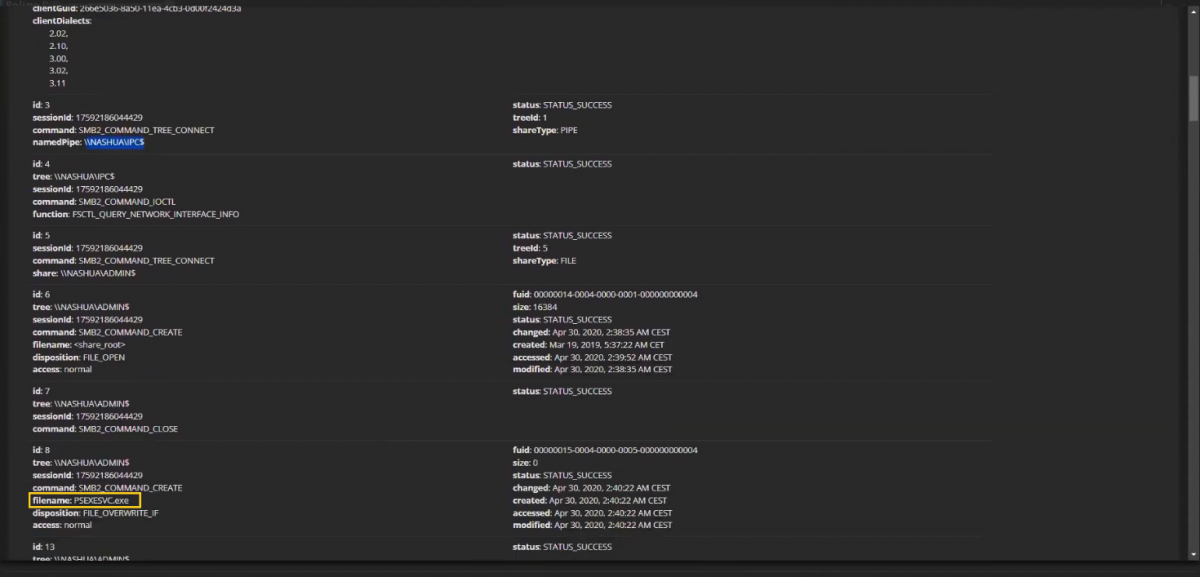
When PSExec is used, the GREYCORTEX Mendel system first captures a connection to the IPC$ share and then displays the event of the PSEXESVC service creation on the target host.
IPC$ is a Windows system resource used for inter-process communication and remote administration. Many Windows management tools, including PSExec, use it to establish service connections before executing commands on a remote system.
A detailed analysis of the network flow allows analysts to see the command that was executed on the remote node. Unlike many encrypted administration protocols, PSExec activity at this level often provides the analyst with clear artifacts, including information about the executed commands and their parameters.
What to look out for during an investigation
- Who initiated the PSExec launch? It is necessary to verify whether the source IP address belongs to a known administrator or a management server. Using PSExec during off-hours or from devices that have not previously performed administrative operations can be a sign of compromise.
- The time of execution, and whether it aligns with technical maintenance regulations or if the corresponding actions were scheduled in the maintenance log.
- What command was executed? Special attention should be paid to commands related to launching PowerShell, CMD, downloading files, creating new user accounts, or changing security settings.
Remote Access via RDP
Remote Desktop Protocol (RDP) is one of the most common tools for remote access and administration in corporate networks. It allows for full graphical access to the remote desktop of a computer or server as if the user were working directly at it.
At the same time, RDP is one of the most popular tools among attackers. Having obtained user or administrator credentials, an attacker can establish an interactive connection to any system with RDP enabled and gain access to all resources available to that host or user.
Unlike SMB or PSExec, RDP traffic is encrypted. This means that an analyst cannot see what exact actions were performed inside the session. However, even the metadata of such a connection can provide crucial information for an incident investigation.
What can be seen in Mendel
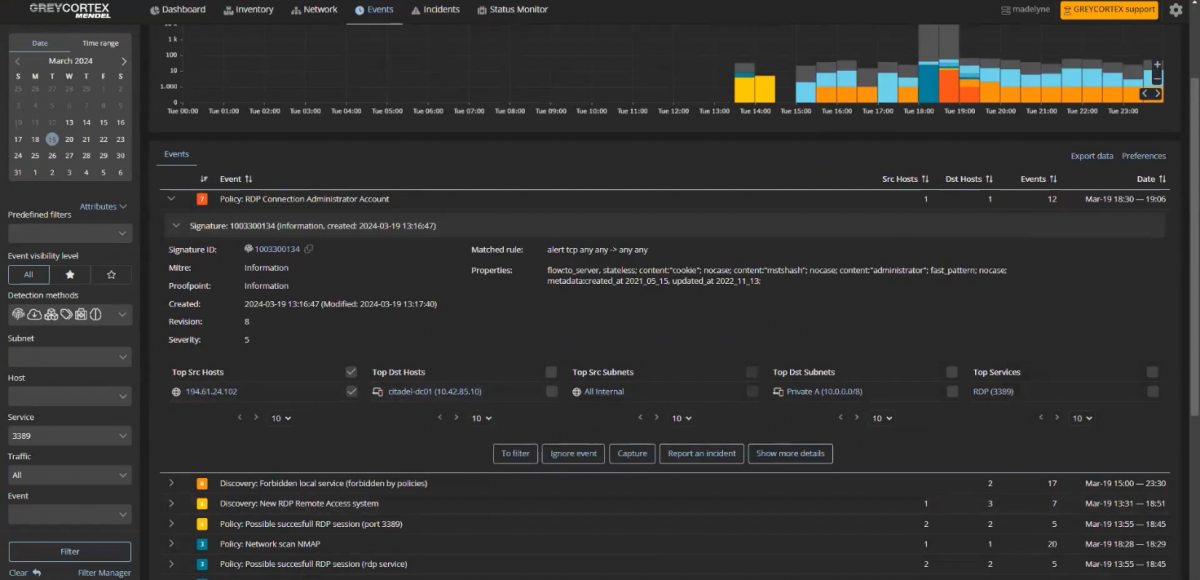
GREYCORTEX Mendel allows for the analysis of RDP session metadata, including:
- the source IP address of the connection;
- the target host IP address;
- the duration of the RDP session;
- the country of origin of the connection.
In practice, session duration is often a more important indicator than it might seem at first glance. A short RDP connection from the internal network does not always look suspicious. However, for a correct analysis, it must be considered in the context of other events.
Special attention should be paid to the device's activity prior to establishing the RDP connection. If the host interacted with unusual systems, performed network scanning, or accessed resources it had never worked with before opening the session, such activity might be part of a broader compromise scenario.
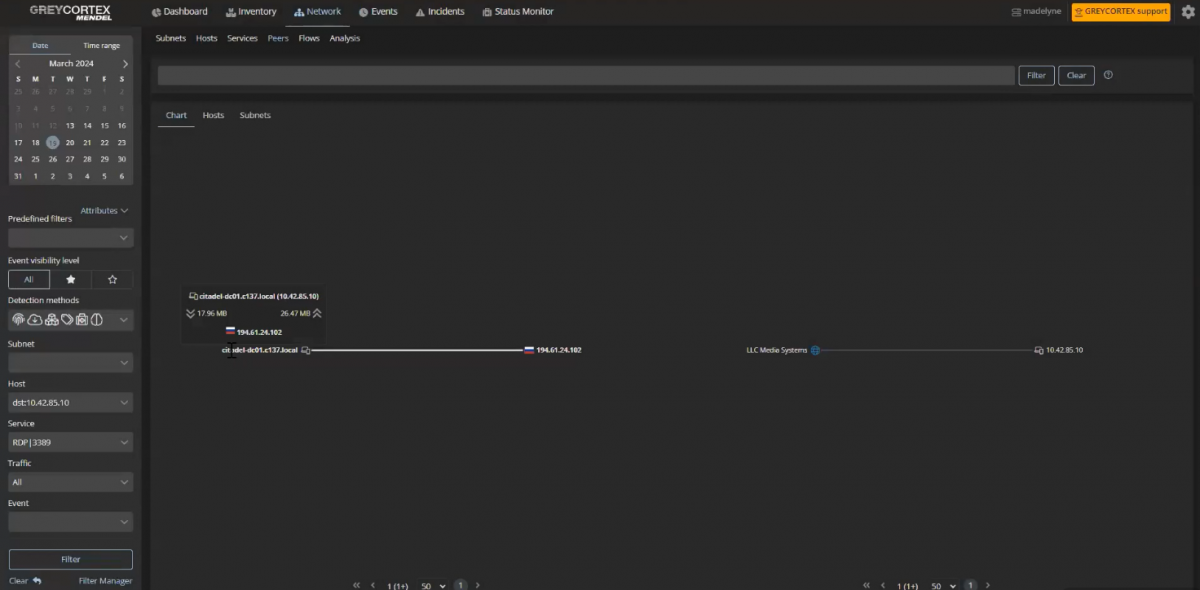
Analyzing events after the RDP session terminates is equally important. It is at this stage that lateral movement often becomes noticeable. Using the interaction graph (Peer Graph), you can track which systems the host began connecting to after the remote access session ended and whether new atypical connections appeared between network nodes.
What to look out for during an investigation
- Where was the connection established from? It is necessary to analyze the activity of the source host prior to the RDP session being established. It is worth checking whether the connection was preceded by atypical network communications, attempts to access unusual systems, or other signs of compromise. You should also evaluate whether RDP use is characteristic of this user or device.
- What happened after the session ended? One of the most important stages of the investigation is analyzing the subsequent activity of the host. It is necessary to trace the chain of connections after the RDP session closes and check whether the device began establishing new internal connections with servers or workstations it had not interacted with previously. Such new connections are often a sign of lateral movement and attempts to expand control over the infrastructure.
- Session time and duration. It is necessary to verify whether it occurred within business hours and complies with internal administrative regulations. RDP sessions established at night, on weekends, or outside agreed-upon technical maintenance windows raise suspicions. Very short connections may indicate automated actions or system availability checks, whereas long interactive sessions can point to active work inside the system by an administrator or an attacker. The connection duration analysis should always be performed in the context of the user's role and the nature of their typical activity.
Credential Theft via LLMNR
LLMNR (Link-Local Multicast Name Resolution) is an auxiliary domain name resolution protocol used by the Windows operating system in cases where DNS cannot locate the required host. In such a situation, the computer sends a broadcast request (a request to all hosts on the local network) asking if anyone knows the location of the required resource. The node with the corresponding name will send a reply to this request, just as any other device in this network segment can also send a reply.
It is this exact characteristic that creates a security risk, and this type of attack is called LLMNR Poisoning. An attacker can send a response to the LLMNR request before the legitimate node does, pretending to be the required resource. After this, the computer that initiated the request will attempt to go through the authentication procedure and will transmit the hash of its credentials. The acquired hash can be exploited for subsequent attacks, credential compromise, and lateral movement across the network.
The unique aspect of this attack is that the user or system usually does not suspect the spoofing. From the operating system's perspective, the interaction looks entirely legitimate.
What can be seen in Mendel
GREYCORTEX Mendel allows you to observe both parts of such an exchange:
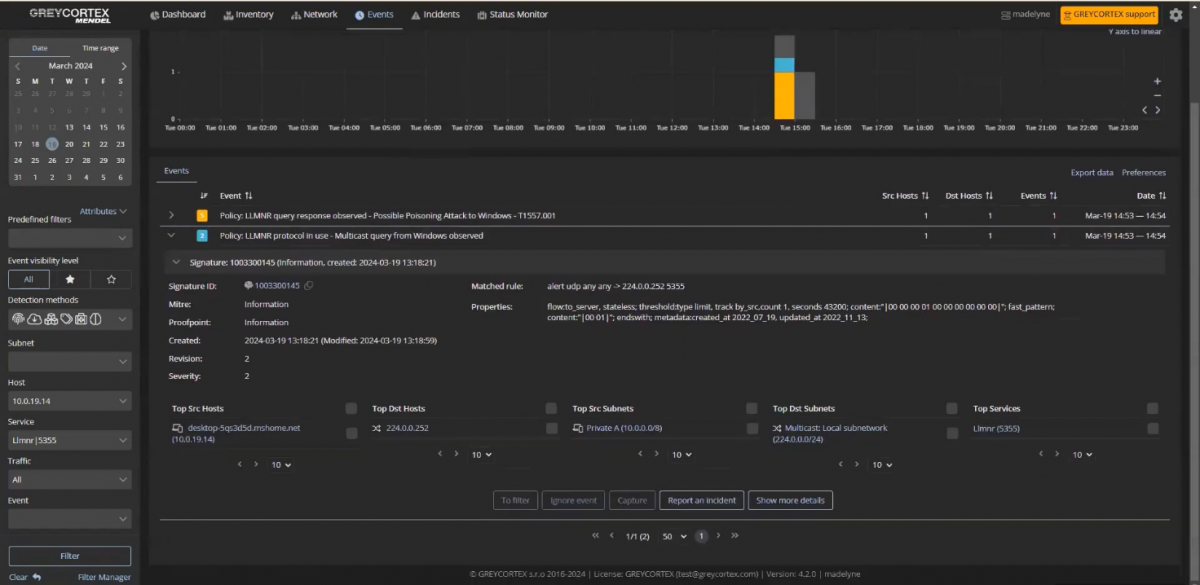
- a broadcast LLMNR request to UDP port 5355;
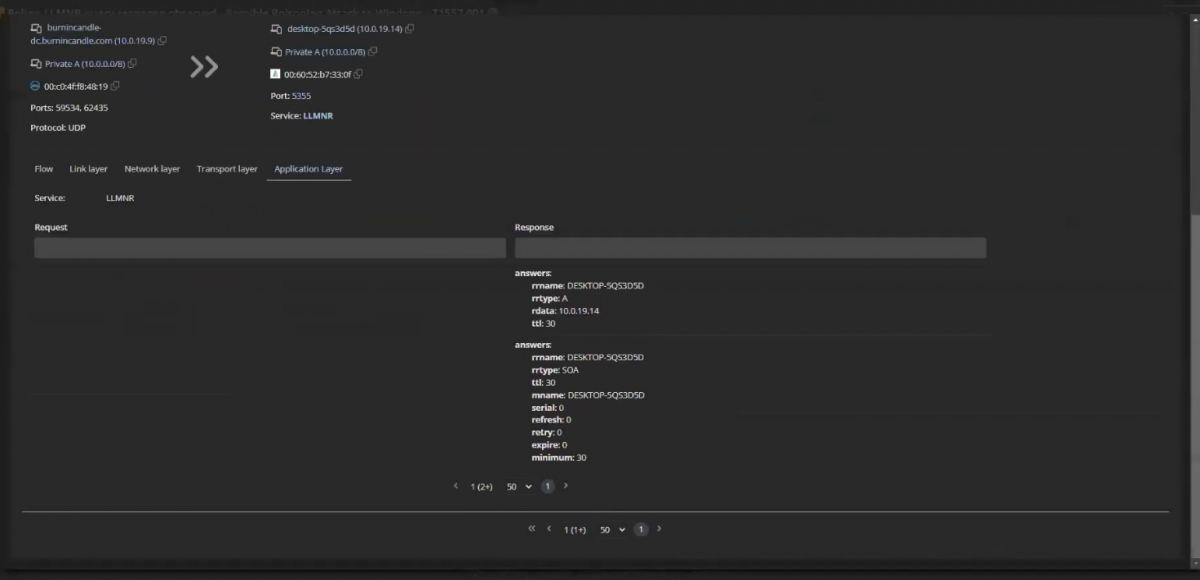
- the response to this request from another network node via the same UDP port 5355.
In a normal scenario, the response comes from the device that actually owns the requested host name.
In the case of LLMNR Poisoning, the response comes from an unexpected network node that has not previously interacted with the system initiating the request. It is these anomalous responses that can indicate an attempt to intercept credentials or preparation for further attack propagation within the network.
 >
>
What to look out for during an investigation
- Who responded to the LLMNR request? First and foremost, it is important to identify the device that sent the response to the LLMNR request. It is necessary to check whether its IP address belongs to the host that should actually be responsible for the requested name, as well as to find out whether there was any prior network interaction between these devices. A response from an unknown node or from a host that has not previously interacted with the request initiator may indicate a spoofing attempt and credential interception.
- Is the use of LLMNR typical for your infrastructure? First of all, it is worth finding out whether LLMNR is used in your network at all. In many organizations, this protocol is centrally disabled via Group Policy due to the security risks associated with it. Therefore, the appearance of LLMNR traffic itself can be an anomalous event and a reason for additional verification.
Combining Different Threat Detection Methods
Lateral movement is rarely accompanied by just a single alert. The primary task of the analyst is to understand whether multiple events are connected to each other and if they are part of a single incident.
To achieve this, GREYCORTEX Mendel simultaneously employs several threat detection methods:
- Network Behavior Analysis (NBA) detects deviations from normal activity, such as connections to new hosts, a sharp increase in traffic volume, or atypical session durations.
- IDS using Deep Packet Inspection (DPI) analyzes network traffic for known attack signatures, malicious commands, exploits, and attacker techniques across layers L2-L7 of the OSI model.
- Reputation Analysis allows for the detection of interactions with known malicious IP addresses, domains, command and control (C&C) servers, and other objects associated with cyber threats.
- Analysis of digital fingerprints and hashes of encrypted traffic (JA3, JA3S, TLS Fingerprinting, and other methods) helps detect malicious tools and anomalous TLS connections even without decrypting the traffic.
- Event Log Processing can be used as an additional data source from network access control or user authorization systems and provides additional context, allowing events to be enriched with information that may be missing from network traffic.
When investigating lateral movement, it is precisely the combination of these methods that allows an incident to be confirmed with confidence. Mendel makes it possible to pivot from a high-level alert to a detailed analysis of network metadata within a single interface.
For example, the system can simultaneously capture an RDP connection and discover that the exact same device began interacting with internal hosts it had never connected to before. This correlation of events allows you to see the entire chain of lateral movement rather than separate, unrelated events.
Full Visibility into the Event Chain
Lateral movement is not an isolated event that can either be detected or missed. It is a sequence of interconnected events unfolding over time and spanning various protocols, devices, and network segments.
Visualizing network events as a result of traffic analysis provides a mechanism for discovering not only the key event itself but also the chain of events that preceded it. The protocols discussed in the article — SMB, PSExec, RDP, and LLMNR — are not specialized attacker tools. They are used in almost any corporate network, so their analysis requires more than just isolated alerts; it demands a sufficient level of network visibility to understand what was happening before the incident appeared and what actions the compromised system performed afterward.
It is also important that the acquired artifacts and metadata do not vanish after the investigation is concluded. Long-term storage of network metadata makes it possible to conduct a retrospective analysis of events months after the incident — during additional investigations, security audits, or attack consequence analysis.
Any lateral movement leaves traces in network traffic. The only question is whether the organization possesses a sufficient level of visibility and the tools to timely detect and correctly interpret these signs.
Do you want to ensure full visibility of your internal network and stop Lateral Movement in time? As an official distributor of GREYCORTEX, Softprom provides an opportunity to deploy a free pilot project in your infrastructure. To receive technical support and test the solution, please fill out the form on our website or request an individual consultation with our specialists.
Share:


