


Build Enterprise Patching and Inventory Dashboards with Amazon QuickSuite and AWS Systems Manager
News | 29.10.2025
AI-Powered Infrastructure Visibility: Automating Patch Compliance Dashboards with Amazon Web Services QuickSuite
In modern enterprise environments, maintaining patch compliance and infrastructure visibility across hybrid and multi-account AWS environments is a critical part of IT security and operations management. Yet building unified dashboards often requires complex data preparation and manual effort.
Amazon QuickSuite—an AI-powered analytics assistant—now enables teams to generate patch compliance dashboards instantly using natural language queries. Combined with AWS Systems Manager (SSM) and AWS Glue, organizations can automate inventory collection and create dynamic, real-time dashboards with minimal effort.
As an official AWS partner, Softprom helps enterprises accelerate visibility, compliance, and reporting using AWS analytics services.
Solution Overview
This solution automates the process of building enterprise-grade dashboards for:
- Patch compliance
- Managed node inventory
- EC2 configuration insights
- Cloud and on-prem infrastructure distribution
- Disk space risk analysis
- AWS driver and agent version tracking
It uses the following AWS services:
| AWS Service | Purpose |
|---|---|
| AWS Systems Manager (SSM) | Collect patch compliance & inventory data |
| AWS Glue | Build centralized data catalog |
| Amazon Athena | Query SSM data |
| Amazon QuickSuite | Generate dashboards via natural language |
| Amazon S3 | Central inventory data storage |
| AWS CloudFormation | Automated deployment |
| AWS Organizations | Multi-account automation |
Architecture Diagram
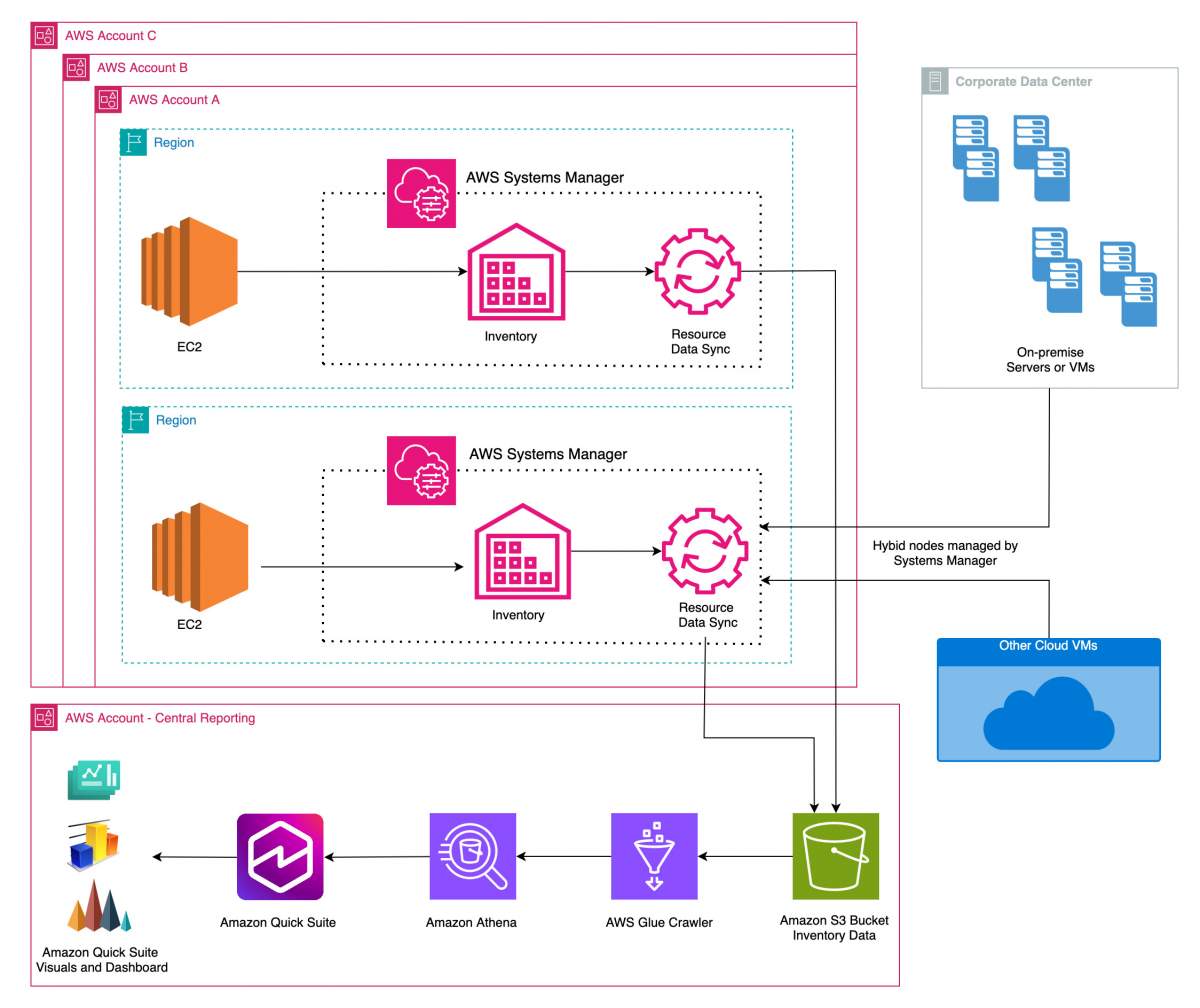
Figure 1 – Enterprise inventory and patch dashboard architecture using Amazon QuickSuite and AWS Systems Manager
The solution collects inventory and compliance data from AWS and on-premises environments using SSM custom associations, synchronizes it into a central S3 bucket, and queries it in Amazon QuickSuite to create dashboards using plain language prompts.
Key Inventory Metrics Collected
| Category | Metrics |
|---|---|
| System Inventory | Cloud provider, OS, disk space, instance status |
| Patch Compliance | Compliant/non-compliant nodes |
| EC2 Drivers | ENA version, NVMe driver, AWS PV driver |
| Configuration | Instance type, license type, hypervisor |
Prerequisites
To deploy this solution, you need:
- Managed EC2 or hybrid nodes registered in AWS Systems Manager
- SSM Inventory enabled
- AWS QuickSuite Admin Pro or Author Pro license
- AWS Organization ID (optional for multi-account)
- Permissions to deploy CloudFormation StackSets
Deployment Steps
- Download the solution template from GitHub.
- Deploy using AWS CloudFormation from your management account.
- Configure: Target SSM resource data sync bucket | Inventory target (ALL or TAG-based selection) | Organization or account-level deployment
- Run AWS Glue Crawler to populate the Athena catalog.
- Grant Amazon QuickSuite access to S3 and Athena.
- Launch the SSM Inventory Analysis dashboard in QuickSuite.
Create Dashboards with Natural Language Prompts
Amazon QuickSuite makes visualization effortless. Example prompts:
| Visualization | Prompt |
|---|---|
| Managed nodes by provider | “Create a pie chart of resourceid by provider” |
| Patch compliance | “Show count of resourceid by compliance status” |
| OS distribution | “Create a donut chart by platformname” |
| Disk space risk | “Visualize resourceid by diskspacestatus” |
| EC2 license types | “Pie chart of resourceid by licensetype” |
| ENA driver versions | “Visual of resourceid by enaversion” |
You can also filter, drill down, and publish dashboards instantly.
Compliance Reporting Made Simple
Use the Compliance Sheet to detect vulnerabilities:
- Non-compliant instances by OS
- Patch gaps sorted by severity
- Critical disk space alerts
- Instance misconfigurations
- Hybrid node coverage
Example query:
“Create a pivot table showing provider, region, resourceid, and missing patch title for NON_COMPLIANT patches.”
Cleanup
To remove all deployed resources:
- Delete CloudFormation stack ssm-inventory-patching-dashboard
- Remove QuickSuite analysis, dashboards, and datasets
Conclusion
Amazon QuickSuite transforms the way IT teams monitor infrastructure and patch compliance. Instead of manually configuring dashboards, teams can:
- Use AI prompts to generate visuals
- Automate multi-account inventory collection
- Improve compliance visibility
- Accelerate IT reporting across the business
As an AWS partner, Softprom helps organizations implement this solution and extend it with monitoring, governance, and FinOps capabilities.
Share:


