


How to Organize Google Drive: Google Workspace & AI Tools
News | 18.06.2026
The Psychology of Cloud Clutter: Why Search Fails and How to Help "Lost" Users
The modern office is increasingly struggling with digital hoarding. Instead of serving as a streamlined collaborative workspace, cloud storage often turns into a bottomless junk drawer or a cluttered wardrobe where files are tossed in just to get them out of the way. We draft documents in a rush, naming them something like “contract_final_new_v2_copy” or “Untitled” and leaving them in our root drive with no logical connection.
When files are named randomly and shared among teammates without a system, the classic search bar becomes nearly useless—it simply buries you in hundreds of similar drafts. Rather than digging through this mess, most employees find it easier to ping a colleague in chat and ask: "Can you send me the link to that file? I’m lost again." This creates constant communication noise and drags down team efficiency.
We've all heard the phrase "A place for everything and everything in its place"—yet our cloud drives often look more like a digital junk drawer.
Google Workspace features are designed to bridge this gap, ensuring that smart organization isn't just a list on a release notes page, but a practical reality that makes your daily workflow fluid.
These tools help structure messy file libraries and create smart thematic groupings, even for users who dread manual folder organization or name files chaotically.
The core philosophy of modern Google Drive is to move away from the outdated concept of "perfect static folders" and leverage dynamic grouping tools that keep everything at your fingertips with minimal effort.
Checklist for Cloud Perfectionists: A Quick System Audit
For users who are confident that their organization system is flawless, we invite you to complete a quick self-audit.
| # | Storage and Organization Assessment Criteria | Status |
|---|---|---|
| 1 | All long-term team projects are hosted on Shared Drives, rather than on personal storage. | [ ] Yes / [ ] No |
| 2 | Personal Workspaces are configured on the "Priority" page to group daily scattered files. | [ ] Yes / [ ] No |
| 3 | Dynamic Projects in Ask Gemini are used to collaboratively organize and query team files. | [ ] Yes / [ ] No |
| 4 | Custom folder color-coding is applied to navigate the updated gray-accented user interface quickly. | [ ] Yes / [ ] No |
| 5 | Loose documents in the root drive are sorted in batches using the AI "Suggest File Moves" tool. | [ ] Yes / [ ] No |
Three Proven Strategies to Organize Files on Google Drive
To ensure your cloud library remains organized and AI search engines can flawlessly locate and analyze your data, we recommend implementing three proven strategies for cloud storage structure:
- Mechanics: Creating thematic shortcuts of documents without changing their physical directories.
- Limits and figures: As of 2026, Google Workspace users can create an unlimited number of Workspaces. However, only up to 8 active Workspace blocks can be displayed simultaneously on the "Priority" page. Each Workspace can contain a maximum of 25 files.
- Mechanics: Grouping folders, files, and Gmail threads into a secure, shared knowledge base for team-based queries with Ask Gemini.
- Limits and figures: Projects synchronize sources without duplication. Files are best kept on Shared Drives, which feature standard storage allocations of 100 GB to 200 GB depending on your Business or Enterprise license tier.
- Mechanics: Automated AI-driven analysis of loose files on your Drive root, offering recommendations to move them into existing or new folders.
- Limits and figures: Generally rolled out in June 2026 for users with eligible licenses.
Traditional Visual and Functional Grouping Tools
Even classic Drive features gain new utility when treated as passive navigation anchors for rapid visual scanning.
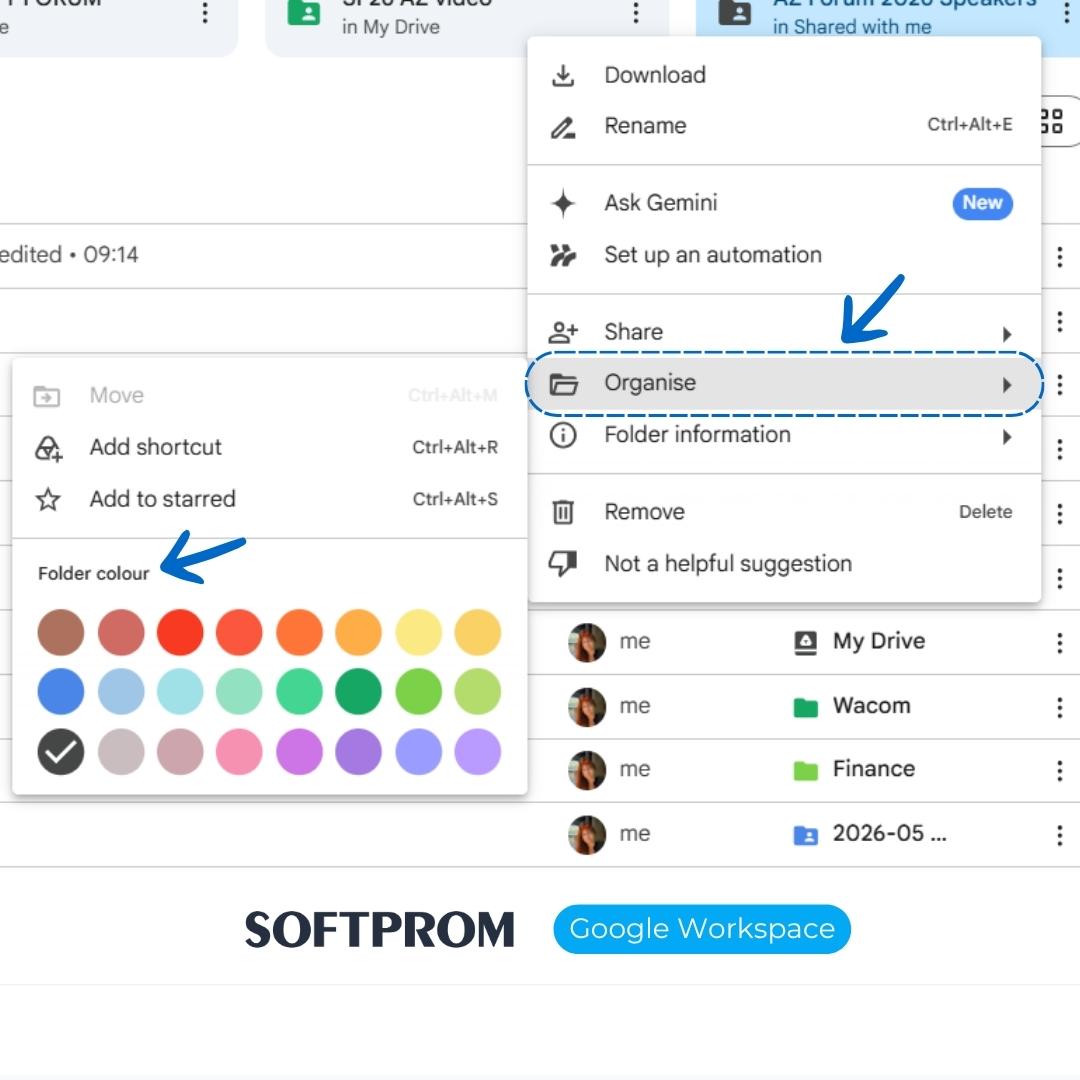
Color-Coding Folders in the Updated Interface
Due to Google Drive's design updates, most UI elements and file-type icons (Docs, Sheets, Slides) default to gray in browser views. This has made rapid visual scanning of documents more challenging. Manual folder colouring has become a critical navigational aid.
To colour-code a folder, right-click on it, select "Organize," and choose a colour. This setting is local to your view—collaborators will still see the folder in its default grey unless they choose their own colours.
This is an ideal passive organization tool: for instance, red can signal urgent operational projects, green for approved financial documents, and blue for archive databases.
The "Starred" Feature and File Descriptions
Adding a star (Add to Starred) via the right-click menu instantly places a file in the Starred section of the left sidebar. This is highly effective for isolating files that you need immediately (such as this week's plan).
For deeper organization, utilize the "Description" field in the file details pane. Since Drive's internal search indexes descriptions, you can add custom tags. Even if a file is named randomly, you can locate it instantly using your personal tags.
Shared Drives vs. Shared Folders: Structuring Securely
The most common mistake in setting up corporate cloud storage is organizing team work via standard shared folders on personal drives.
- Personal Drive (My Drive) and Shared Folders: All files belong to the individual creator. If the employee departs and their account is deleted, vital corporate documents can disappear or become inaccessible "orphaned" files.
- Shared Drives: This feature is native to Google Workspace. Files on Shared Drives belong to the organization, not the individual. Personnel changes do not affect access—documents remain in place, and granular roles protect the structure from accidental deletion.
Conclusion: Clean Data as a Foundation for AI Success
Organizing your file structure is no longer just about personal preference. In the age of AI, structured data and proper access controls are critical to corporate digitization.
If corporate data is cluttered, duplicated, or poorly structured, AI assistants (like Gemini or custom models) cannot extract accurate insights or write reliable reports.
Establishing a clean cloud environment is the first step toward secure and high-performing business automation.
Transitioning to Google Workspace plans with the help of Softprom enables companies to eliminate manual bottlenecks and build a secure, highly organized digital workspace.
Share:


